Notion GitHub Tracker
Introduction
Notion GitHub Tracker is a dynamic Next.js application designed to seamlessly integrate GitHub user data into Notion. This tool offers a convenient way to track and display GitHub contributions directly within a Notion page.
Live Deployment
The project is deployed and can be accessed at Notion GitHub Tracker. Simply replace :username with your GitHub username and optionally specify the theme (light or dark, with dark being the default).
Example: https://notion-github-graph.vercel.app/kossakovsky?theme=dark
Dark theme
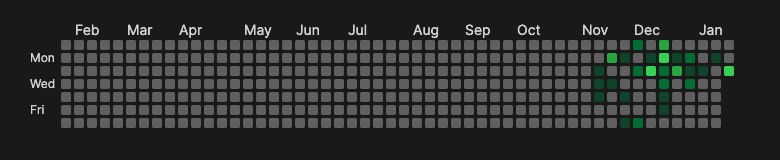
Light theme

Getting Started
To run the development server locally:
npm run dev
# or
yarn dev
# or
pnpm dev
# or
bun dev
Visit http://localhost:3000 in your browser to view the application.
Installation and Setup
- Clone the repository.
- Install dependencies using
npm installoryarn install. - Start the development server as mentioned above.
Usage
The project allows users to view GitHub contribution data directly on Notion. Follow these steps to use it:
- Navigate to the deployed URL: https://notion-github-graph.vercel.app/:username?theme=dark.
- Replace
:usernamewith your GitHub username. - Choose the theme by setting
theme=darkortheme=lightin the URL.
Notion Integration
To embed this in Notion:
- Create a new Embed block in your Notion document.
- Set the URL to the deployed project URL with your GitHub username.
- Adjust the size of the embed block as needed.
Contributing
Contributions to improve Notion GitHub Tracker are welcome. Feel free to fork the repository, make changes, and submit a pull request.
Known Caveats
- Not fully responsive, which may affect the display on mobile devices.
- Limited theme adaptability in Notion embeds due to Notion's current API constraints.